> ## Documentation Index
> Fetch the complete documentation index at: https://docs.juneops.com/llms.txt
> Use this file to discover all available pages before exploring further.
# Asset Discovery & Inventory
> Discover, classify, and monitor your device inventory with June
June's asset discovery engine automatically identifies, classifies, and monitors all devices in your organization, providing real-time visibility into your entire device fleet.
## What you'll accomplish
* Understand how June discovers and classifies devices
* Set up automated device health monitoring
* Learn to track asset lifecycle and history
* Configure device details and custom attributes
## How Asset Discovery Works
June discovers devices through multiple channels to ensure comprehensive coverage:
### Discovery Sources
Primary source: Devices managed by your MDM systems (Jamf Pro, Intune, Kandji)
Bulk import: Upload existing inventory data from spreadsheets or other systems
### Automatic Classification
June automatically classifies discovered devices based on:
* **Device Type**: Desktop, laptop, tablet, mobile, server
* **Operating System**: macOS, Windows, iOS, Android, Linux
* **Manufacturer**: Apple, Dell, HP, Lenovo, Microsoft, etc.
* **Form Factor**: MacBook Pro, iMac, Surface Pro, etc.
* **Ownership**: Corporate, personal, shared
## Understanding Asset Classification
### Device Categories
| Category | Description | Examples |
| --------------------- | ---------------------------- | ------------------------------ |
| **Computing Devices** | Primary work devices | MacBook Pro, Dell Laptop, iMac |
| **Mobile Devices** | Phones and tablets | iPhone, iPad, Android phones |
| **Peripherals** | Connected accessories | Keyboards, mice, monitors |
| **Infrastructure** | Network and server equipment | Routers, switches, servers |
| **Other Assets** | Miscellaneous IT equipment | Printers, projectors, cameras |
### Health Status Indicators
June continuously monitors device health with these status levels:
* Last check-in within expected timeframe
* No critical security issues
* OS and applications up to date
* Adequate storage and performance
* Minor issues detected (low storage, outdated software)
* Check-in slightly delayed
* Non-critical compliance violations
* Performance degradation noted
* Security vulnerabilities detected
* Significant check-in delays
* Critical compliance failures
* Hardware failures or major issues
* Device not responding
* Lost or stolen
* Pending deployment
* Insufficient data for assessment
## Device Health Monitoring
### Automated Health Checks
June performs continuous health monitoring across multiple dimensions:
#### System Health
* CPU and memory utilization
* Storage capacity and usage
* Battery health (for mobile devices)
* Hardware component status
#### Security Health
* OS patch level and updates
* Antivirus status and definitions
* Firewall configuration
* Encryption status
#### Compliance Health
* Policy adherence
* Certificate validity
* Configuration compliance
* Access control compliance
### Setting Up Health Monitoring
1. Navigate to Device Management > Health Policies
2. Set thresholds for different health metrics
3. Define escalation rules for critical issues
4. Configure notification preferences
Adjust monitoring parameters:
* Check-in frequency expectations
* Storage warning thresholds
* Update compliance timeframes
* Performance benchmarks
Configure alerts for:
* Critical health status changes
* Devices going offline
* Compliance violations
* Performance degradation
## Asset Lifecycle Tracking
### Lifecycle Stages
June tracks devices throughout their entire lifecycle:
* Purchase order tracking
* Vendor information
* Cost and budget allocation
* Delivery and receiving
* Initial configuration
* Employee assignment
* Setup and installation
* Quality assurance checks
* Daily operation monitoring
* Health and performance tracking
* Maintenance and support
* User satisfaction
* Repairs and upgrades
* Warranty management
* Preventive maintenance
* Performance optimization
* End-of-life planning
* Data wiping and security
* Asset disposal or recycling
* Final accounting
### Tracking History and Changes
June maintains comprehensive audit trails:
* **Assignment History**: Track device ownership and location changes
* **Configuration Changes**: Monitor policy and setting modifications
* **Maintenance Records**: Log repairs, upgrades, and service events
* **Performance Trends**: Historical performance and health data
* **Compliance History**: Track compliance status over time
## Viewing Device Details
### Device Overview
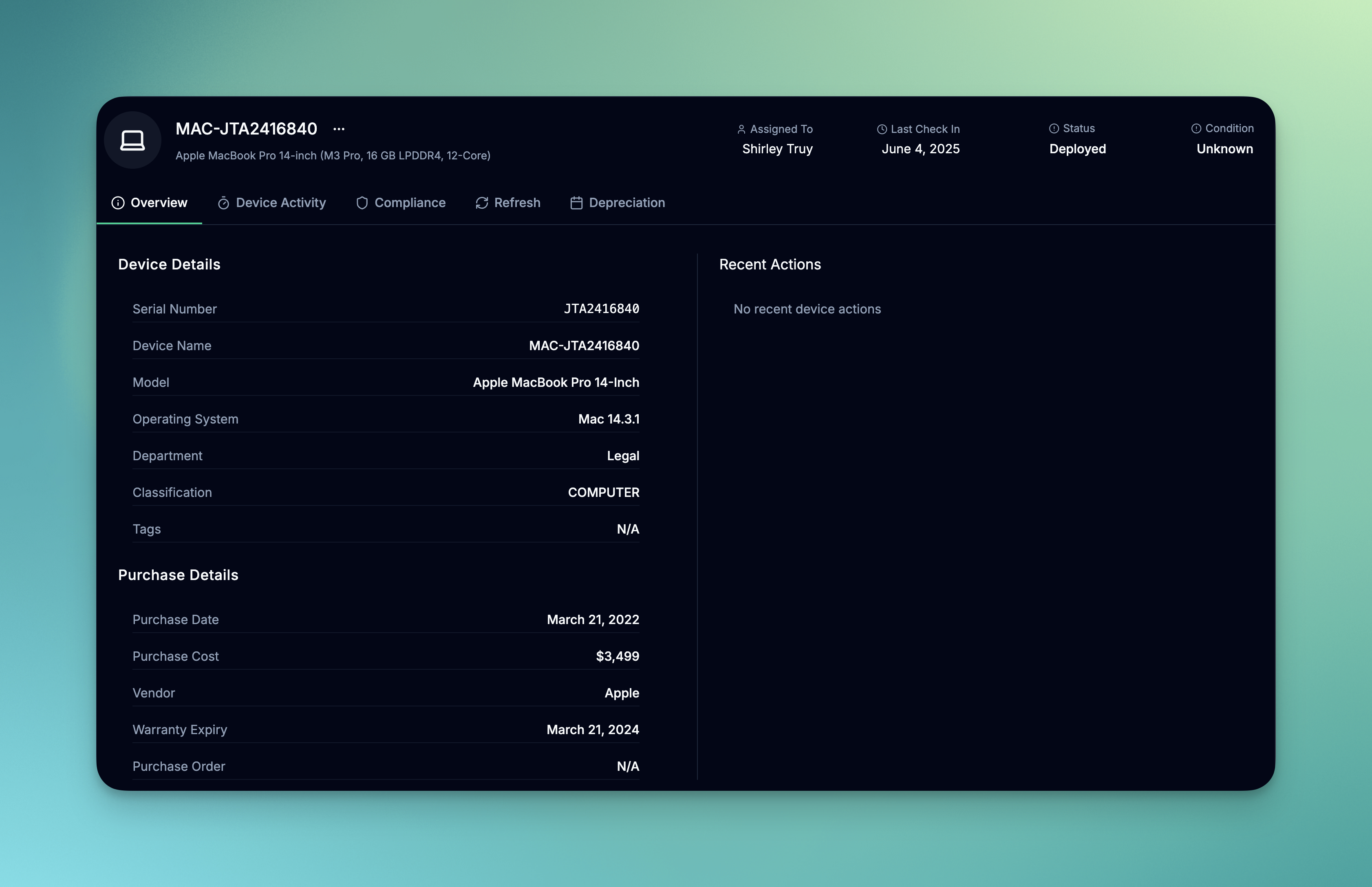 Each device page provides comprehensive information. You can also view the device details in the device list view by clicking on the device.
#### Basic Information
* Device name and type
* Serial number and asset tag
* Current user assignment
* Location and department
* Health status and last check-in
#### Hardware Specifications
* Processor and memory
* Storage capacity and usage
* Network interfaces
#### Software Inventory
* Operating system version
* Installed applications
* Security software status
* Configuration profiles
#### Compliance Status
* Policy adherence
* Security posture
* Disk encryption status
* Firewall status
* Remote access status
#### Refresh Policy
* Last refresh date
* Next refresh date
* Refresh status
* Refresh policy
#### Device Deprecation
* Current asset value
* Deprecation date
* Deprecation reason
* Deprecation status
## Bulk Operations
### Import Existing Inventory
Create a CSV file with required columns:
* Device name or serial number
* Device type and manufacturer
* Current user assignment
* Location and department
Map CSV columns to June device attributes
Review data for accuracy before completing the import
### Bulk Device Updates
Update multiple devices simultaneously:
* Change device assignments
* Update location information
* Apply tags and categories
* Modify custom attributes
## Best Practices
### Discovery Optimization
* **Regular Sync**: Ensure MDM integrations sync frequently
* **Network Coverage**: Configure network discovery for comprehensive coverage
* **Data Quality**: Regularly review and clean up device data
* **Standardization**: Use consistent naming conventions and categorization
### Health Monitoring
* Set realistic health thresholds based on your environment
* Configure appropriate alert frequencies to avoid notification fatigue
* Regularly review and adjust health policies
* Use trending data to identify patterns and proactive maintenance needs
### Lifecycle Management
* Define clear lifecycle stages for your organization
* Automate lifecycle transitions where possible
* Maintain accurate cost and warranty information
* Plan refresh cycles based on device health and performance data
## Troubleshooting Discovery Issues
### Common Problems
* Check MDM integration sync status
* Verify network connectivity and permissions
* Review discovery filters and exclusions
* Confirm device enrollment status in source systems
* Verify unique identifier configuration
* Check for devices appearing in multiple discovery sources
* Review merge rules and duplicate detection settings
* Manually merge or remove duplicates as needed
* Review health policy configuration
* Check data freshness and sync timing
* Verify device connectivity and management status
* Adjust health thresholds if too sensitive
## Next Steps
Once you have a comprehensive device inventory:
Learn to find devices quickly using natural language queries
Perform remote management tasks on your discovered devices
Create saved views for different device categories and use cases
Generate inventory reports and analytics from your device data
Device discovery runs continuously in the background. New devices are typically discovered within 15-30 minutes of being connected to your network or enrolled in MDM systems.
Each device page provides comprehensive information. You can also view the device details in the device list view by clicking on the device.
#### Basic Information
* Device name and type
* Serial number and asset tag
* Current user assignment
* Location and department
* Health status and last check-in
#### Hardware Specifications
* Processor and memory
* Storage capacity and usage
* Network interfaces
#### Software Inventory
* Operating system version
* Installed applications
* Security software status
* Configuration profiles
#### Compliance Status
* Policy adherence
* Security posture
* Disk encryption status
* Firewall status
* Remote access status
#### Refresh Policy
* Last refresh date
* Next refresh date
* Refresh status
* Refresh policy
#### Device Deprecation
* Current asset value
* Deprecation date
* Deprecation reason
* Deprecation status
## Bulk Operations
### Import Existing Inventory
Create a CSV file with required columns:
* Device name or serial number
* Device type and manufacturer
* Current user assignment
* Location and department
Map CSV columns to June device attributes
Review data for accuracy before completing the import
### Bulk Device Updates
Update multiple devices simultaneously:
* Change device assignments
* Update location information
* Apply tags and categories
* Modify custom attributes
## Best Practices
### Discovery Optimization
* **Regular Sync**: Ensure MDM integrations sync frequently
* **Network Coverage**: Configure network discovery for comprehensive coverage
* **Data Quality**: Regularly review and clean up device data
* **Standardization**: Use consistent naming conventions and categorization
### Health Monitoring
* Set realistic health thresholds based on your environment
* Configure appropriate alert frequencies to avoid notification fatigue
* Regularly review and adjust health policies
* Use trending data to identify patterns and proactive maintenance needs
### Lifecycle Management
* Define clear lifecycle stages for your organization
* Automate lifecycle transitions where possible
* Maintain accurate cost and warranty information
* Plan refresh cycles based on device health and performance data
## Troubleshooting Discovery Issues
### Common Problems
* Check MDM integration sync status
* Verify network connectivity and permissions
* Review discovery filters and exclusions
* Confirm device enrollment status in source systems
* Verify unique identifier configuration
* Check for devices appearing in multiple discovery sources
* Review merge rules and duplicate detection settings
* Manually merge or remove duplicates as needed
* Review health policy configuration
* Check data freshness and sync timing
* Verify device connectivity and management status
* Adjust health thresholds if too sensitive
## Next Steps
Once you have a comprehensive device inventory:
Learn to find devices quickly using natural language queries
Perform remote management tasks on your discovered devices
Create saved views for different device categories and use cases
Generate inventory reports and analytics from your device data
Device discovery runs continuously in the background. New devices are typically discovered within 15-30 minutes of being connected to your network or enrolled in MDM systems.